
OmniFocus rocks. I can’t really imagine managing myself personally or professionally without this tool. Nevertheless, despite thousands of hours of development and beta testing, it has its share of quirks. Notably, in my work I have a few daily-type tasks I set to repeat every day. Unfortunately, there’s no “workday” option in the repeat choices, so every weekend I end up with a Saturday and Sunday repetition. I could either:
- Mark them complete (ignoring the fact that I’ve just claimed to have done nonexistent work);
- Mark them complete and delete the “done” items before they disappear (solving the first issue)
- Change the start/due dates in the Inspector (cumbersome)
My Defer script allows you to defer, or ‘snooze’, selected projects or tasks by a given number of days. (Disclaimer for GTD pedants: my use of the word “defer” here is sanctioned by the New Oxford American Dictionary, not David Allen.)
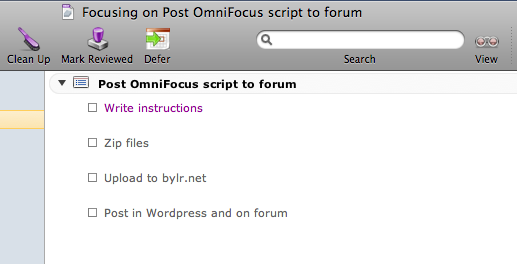
Usage: Select the task(s) and/or project(s) you wish to defer. Invoke the script from the toolbar or script menu:
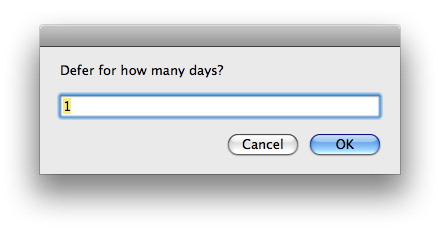
Enter the number of days to defer the items in the resulting dialog box and select “OK” (default is 1, so feel free to just hit Return to ‘snooze for a day’).
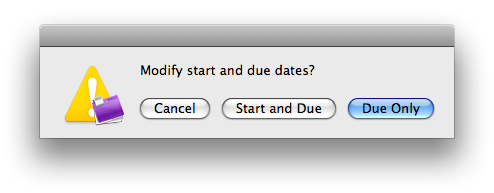
The script will then prompt you whether to defer both start and end dates of the items. “Due [date] only” is the default option, so again, feel free to hit return to snooze your due date only.
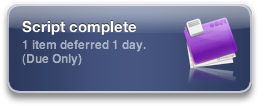
Finally: a Growl notification to signify your success. (If desired, you can use a standard OS alert dialog or no alert at all. See the script for details.)
19 Feb 2009: version 0.2 is now available. Release notes here. Download link is for current version.
This is terrific. Thanks for sharing it.
Fantastic! I have been looking into something like this for a long time, having requested it from the Omni people as a toolbar option. Well here it is! However I am getting an error wnen selecting several actions and trying to snooze one day.
AppleScript reported the following error: OmniFocus got an error: Can’t get tree 15 of tree 1 of content of document window id 448 of document id “oeJ-vPFksgV”. Invalid index.
Do you know how to fix this?
Thanks
Manuel
Manuel—glad you enjoy the script! And I’m sorry for my delayed response.
I’ve encountered the same issue and haven’t had any success debugging. I may contact OmniGroup for support.
Just a heads up that this script did some light damage to my due dates, nothing serious but not exactly harmless either. I selected several items, deferred them en mass for 1 day, some worked but most did not and I got the error noted by Manuel. I continued selecting and attempting to defer, getting a couple more to defer each time. But after a few iterations, I realized that the script was somehow still acting on previously deferred items, resulting in a real mess of incorrect start and due dates. Arg. This script is most definitely not rock solid. It’s been working fine for me on one or two deferrals at a time, but it really choked on multiple items.
Big Cloits—I’m sorry to hear you had trouble with it. Others have reported unexpected behavior when dealing with large lists. Because I primarily use the script on a couple items at once, this issue hasn’t been a big deal for me. I keep hoping Omni will add this functionality built-in, but in the meantime an updated script might be in order…
Thanks, this works for me with OmniFocus 1.6.1. I only tried it with one item at a time so far…
Thanks for this and also the snooze script Dan. They are handy. Here’s a question that shows my ignorance about scripting. Is there a simple way to change the toolbar icon for these two scripts so they aren’t the same? – Damian
Re: my previous comment, I mean so they aren’t the same as icons used for other things on the toolbar…
@Damian The toolbar icon is determined by the icon of the script file. So changing the script file’s icon in the Finder should do the trick. (Not sure if you’d need to remove/re-add to toolbar after the change or if it would automatically recognize the edit.)
Thanks, this a very useful script!
Is there any way I could adjust the script to defer only start dates? I realize “snooze” offers something like that, but I would like to be able to batch defer the start dates of a bunch of items with different start dates.
Hi Rob,
I’ve added a hidden option for you in the latest version. You’ll need to change the settings just a bit; open the script and set “promptForChangeScope” to “false” and “changeScope” to “Start Only”.
You can find these settings below the description area of the script.Dan
Hi Dan – great script!
Can’t find script icon in Finder…
@Dave – you just need to change the icon of the script file itself.
This looks great, thanks for scripting it up, documenting and offering it! I have a different use case: I frequently find myself needing to “defer” a bunch of actions by 30 minutes or an hour (when I get a “drop everything” task I didn’t plan on or when I’m running behind). Is there an easy way to change this script from “days” to “minutes”… I can probably dig into the guts but it would be awesome to have a default “defer unit” being days, hours, minutes. Thanks again!
Joe – see my email to you with a change that should give you more flexibility. Once I test it for a few days I’ll post it online as well.