10/31/11: Updated to work with Growl 1.3 (MAS version).
TL;DR: If you want to use Growl notifications in your AppleScripts without causing problems for people who don’t have it installed, feel free to use this code.
For anyone who writes AppleScripts that use Growl notifications, the problem is familiar: if a user doesn’t have Growl installed, the script throws a fit when they try to run it. Specifically, at load time, the AppleScript interpreter looks for all the applications listed in the script to retrieve their scripting dictionaries, and if it can’t find any of the listed applications, it asks the user where to find it:
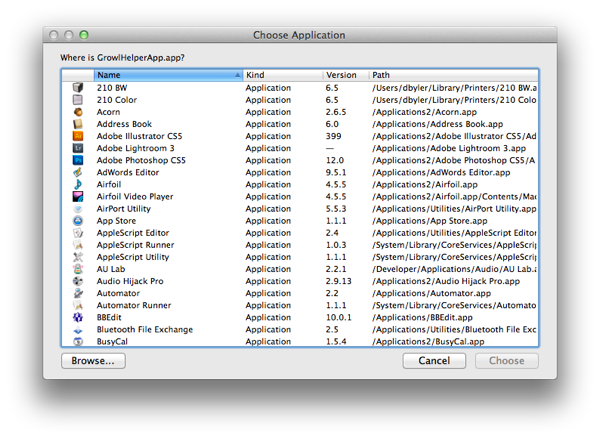
This can be frustrating for users who don’t have Growl installed: either they don’t know what Growl is (and therefore have no idea what to do in this situation), or they actively prefer not to have Growl on their system. In neither case do you want to force users to install Growl.
Although others have written about this issue—including a couple solutions that work—I still spent a lot of time and frustration trying to work through the issue and thought it might be helpful to post a survey of different methods that don’t work—and why.
Method one (bad): Growl, straight-up
Pros: Elegant, simple, as Growl intended. Cons: Script chokes on Growl-free systems.
The simplest solution is to call Growl using the intended syntax, ignoring users who don’t have Growl installed. The code is straightforward and easy to understand:
[code lang=”AppleScript”]
property growlAppName : “Dan’s Scripts”
property allNotifications : {“General”, “Error”}
property enabledNotifications : {“General”, “Error”}
property iconApplication : “OmniFocus.app”
tell application “GrowlHelperApp”
register as application growlAppName all notifications allNotifications default notifications enabledNotifications icon of application iconApplication
notify with name “General” title “Note title” application name growlAppName description “Note description”
end tell
[/code]
But if the point of your script is to simplify a task, it’s not very helpful to publish something that won’t run for those who don’t happen to share your idea of a pleasant notification experience.
And you probably don’t want to maintain two versions of the same script.
Interlude: Detecting Growl
To support both Growl-enabled and Growl-free systems, you need to detect whether Growl is installed before deciding what to do. For that, best practice1 seems to be to first check whether Growl is running:
[code lang=”AppleScript”]
tell application “System Events” to set GrowlRunning to (count of (every process where creator type is “GRRR”)) > 0
[/code]
Then, if Growl isn’t running, check if it’s installed, try to launch it if so2, and run the alternative notification if not:
[code lang=”AppleScript”]
if not GrowlRunning then –if Growl isn’t running…
set GrowlPath to “” –check to see if Growl is installed…
try
tell application “Finder” to tell (application file id “GRRR”) to set strGrowlPath to POSIX path of (its container as alias) & name
end try
if GrowlPath is not “” then –…try to launch if so…
do shell script “open ” & strGrowlPath & ” > /dev/null 2>&1 &”
delay 0.5
set GrowlRunning to my IsGrowlRunning()
end if
end if
if GrowlRunning then
NotifyWithGrowl(alertName, alertTitle, alertText, useSticky)
else
NotifyWithoutGrowl(alertText)
end if
[/code]
Method two (bad): string encapsulation
Pros: Used to work; doesn’t choke on Growl-free systems. Cons: No longer works with Growl.
For a long while I used a very simple method that encapsulated Growl statements in a string variable, which prevents the interpreter from choking on systems that don’t have Growl installed:
[code lang=”AppleScript”]
tell application “Finder” to tell (application file id “GRRR”) to set growlHelperAppName to name
tell application growlHelperAppName to run script “register as application \”” & growlAppName & “\” all notifications {\”General\”, \”Error\”} default notifications {\”General\”, \”Error\”} icon of application \”OmniFocus.app\””
tell application growlHelperAppName to run script “notify with name \”General\” title \”” & alertTitle & “\” application name \”” & growlAppName & “\” description \”” & alertText & “\” icon of application \”OmniFocus.app\””
[/code]
Unfortunately this method no longer works when Growl is installed:
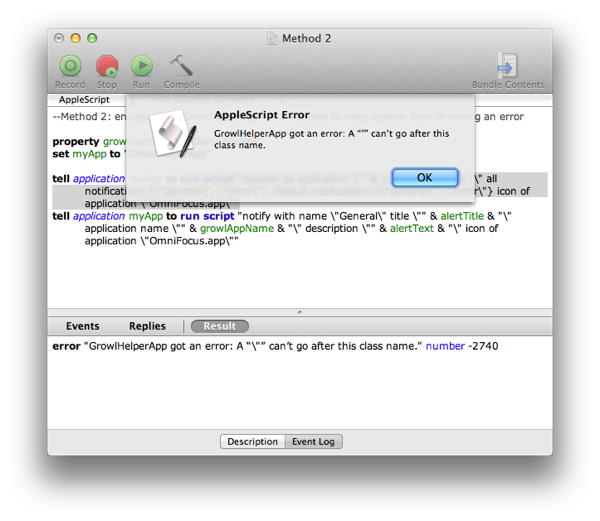
So that’s out.
Method three (bad): growlnotify
Pros: Elegant, doesn’t choke on Growl-free systems. Cons: Doesn’t work unless growlnotify is installed.
Another method is to use the growlnotify utility that ships with Growl Extras, and call it via a shell script:
[code lang=”AppleScript”]
do shell script “/usr/local/bin/growlnotify OmniFocus -n ‘General’ -m ‘My message'”
[/code]
But growlnotify isn’t part of the base Growl installation, so for Growl users who don’t have the tool installed, it won’t be obvious why the notification doesn’t work.
Method four (good): osaScript
Pros: Works for Growl users, doesn’t choke on Growl-free systems, uses standard AppleScript syntax. Cons: Verbose and unsightly.
The first method I found that actually works in 2011, described by elasticthreads, is to encapsulate the entire Growl-facing script as its own (perfectly quoted) string, and run that using the shell tool osascript:
[code lang=”AppleScript”]
set osascript to “property growlAppName : \”Dan’s Scripts\”
property allNotifications : {\”General\”, \”Error\”}
property enabledNotifications : {\”General\”, \”Error\”}
property iconApplication : \”OmniFocus.app\”
tell application \”GrowlHelperApp\”
register as application growlAppName all notifications allNotifications default notifications enabledNotifications icon of application iconApplication
notify with name \”General\” title \”Note title\” application name growlAppName description \”Note description\”
end tell
”
set shellScript to “osascript -e ” & quoted form of osascript & ” &> /dev/null &”
ignoring application responses
do shell script shellScript
end ignoring
[/code]
I didn’t want to hardcode the notification parameters, and with all the quoted stringiness, extracting them required writing a method for converting an AppleScript dictionary to string form. Here’s my complete version of this method:
[code lang=”AppleScript”]
property growlAppName : “Dan’s Scripts”
property allNotifications : {“General”, “Error”}
property enabledNotifications : {“General”, “Error”}
property iconApplication : “OmniFocus.app”
set thisNotificationName to “General”
set thisNotificationTitle to “Note title”
set thisNotificationDescription to “Note description”
tell application “Finder” to tell (application file id “GRRR”) to set growlHelperAppName to name
on dictToString(dict)
set dictString to “{”
repeat with i in dict
if (length of dictString > 1) then set dictString to dictString & “, ”
set dictString to dictString & “\”” & i & “\””
end repeat
set dictString to dictString & “}”
return dictString
end dictToString
on notifyWithGrowl()
set osascript to “property growlAppName : \”” & growlAppName & “\”
property allNotifications : ” & dictToString(allNotifications) & ”
property enabledNotifications : ” & dictToString(enabledNotifications) & ”
property iconApplication : \”” & iconApplication & “\”
tell application \”” & growlHelperAppName & “\”
register as application growlAppName all notifications allNotifications default notifications enabledNotifications icon of application iconApplication
notify with name \”” & thisNotificationName & “\” title \”” & thisNotificationTitle & “\” application name growlAppName description \”” & thisNotificationDescription & “\”
end tell
”
set shellScript to “osascript -e ” & quoted form of osascript & ” &> /dev/null &”
ignoring application responses
do shell script shellScript
end ignoring
end notifyWithGrowl
[/code]
This method doesn’t choke on Growl-free systems, uses standard (though obscured) AppleScript syntax, and works for the Growly. It’s quite a lot of code, though, and isn’t very pretty.
Method five (good): AppleScript literal syntax
Finally—hats off to Dave Nanian for this method—AppleScript has an obscure literal syntax that can be used instead of standard syntax. In brief, literal syntax is a way of describing statements in guillemet-enclosed events and classes. This is what the above code looks like in literal syntax…
[code lang=”AppleScript”]
property growlAppName : “Dan’s Scripts”
property allNotifications : {“General”, “Error”}
property enabledNotifications : {“General”, “Error”}
property iconApplication : “OmniFocus.app”
tell application “Finder” to tell (application file id “GRRR”) to set growlHelperAppName to name
on notifyWithGrowl()
tell my application growlHelperAppName
«event register» given «class appl»:growlAppName, «class anot»:allNotifications, «class dnot»:enabledNotifications, «class iapp»:iconApplication
«event notifygr» given «class name»:”General”, «class titl»:”Notes processed”, «class appl»:growlAppName, «class desc»:”strReport”
end tell
end notifyWithGrowl
[/code]
N.B. While literal syntax doesn’t require encapsulating the app name in a string variable, you should do this for two reasons. First, if the application name is used, the interpreter will try to find GrowlHelperApp, thus choking on Growl-free systems. Also, Script Editor will try to convert the code to normal syntax, which you don’t want if you’ve gone to the trouble of crafting this version. Note also Nanian’s warning to use tell my application, not tell application.
This method won’t choke Growl-free systems as long as you don’t run the code; make sure you include a check to see if Growl is installed before running this code.
All tedious things must come to an end
Giving Apple the benefit of the doubt, I’ll make two assumptions:
It’s generally important to have access to the scripting dictionaries of applications referenced in your script.
Growl is an edge case in that it’s simultaneously useful to include in a script but superfluous to the script’s execution.
But it’s a problem that people spend so much time coming up with workarounds for such a seemingly straightforward problem. If you have any other methods for dealing with the “Growl not installed” scenario, I’d love to hear them.
You can download a paste-and-go version of the code (which includes both functioning methods) here, or click here to open it in your script editor of choice3.
Much of this is gleaned from discussion and examples posted at the OmniGroup and DEVONtechnologies forums. I think the current version is most similar to one from Rob Trew.↩
In theory, you should be able to proceed without explicitly seeing if Growl is running/trying to launch if not, because calling tell application "x" will cause it to launch if it’s not already running. However, there was a time that Growl would crash frequently (I once measured one Growl crash every 7-8 activations), so checking for a successful launch was one way to ensure consistent behavior. Growl has gotten very stable, so this shouldn’t be a problem, but it’s cheap and fast to run the check so I keep it in.↩
Hat tip to Don Southard’s handy AppleScript-encoding service, which created the “open” link. ↩
 Now the key information gets top billing: